A swimming timetable visitors actually understand
Written by William ElegeertOctober 15 2026
Share


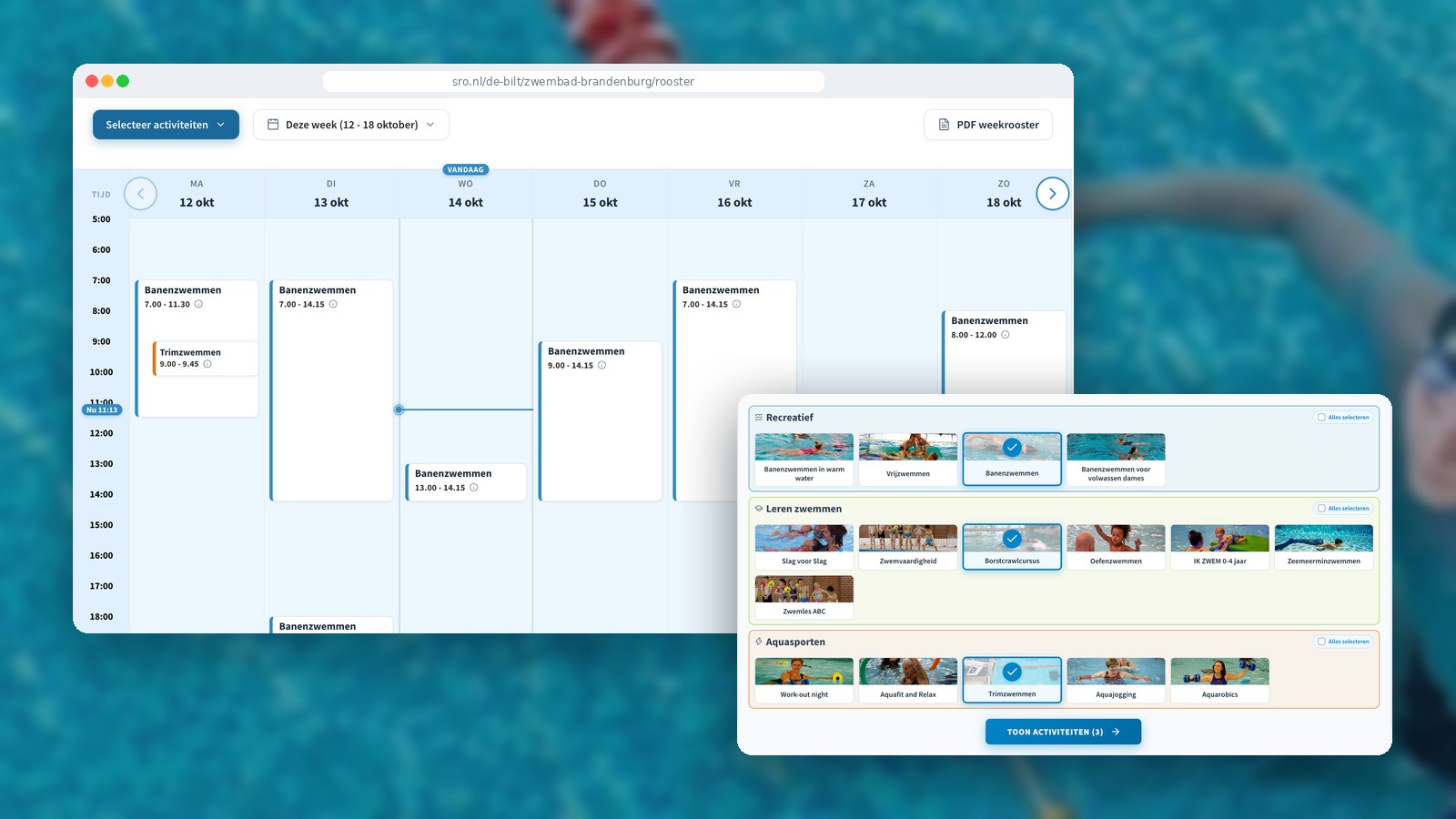
For SRO, a Dutch operator of sports and leisure facilities, we designed a new swimming timetable: a clear weekly overview, filters for your activities and a button to buy a ticket straight away. The first version is live at Zwembad Brandenburg in De Bilt.
Why a new timetable?
The idea didn’t come from us, but from the visitors themselves. During SRO’s user sessions, it became clear that the swimming timetable was confusing. Visitors wanted a complete overview of the week, not just what was still left to do that week.
A visitor’s question is usually simple: when can I swim this week, and how do I get in? We designed the new timetable around that question.
The old timetable: everything’s there, but you have to search
The existing timetable, as used at the Boerhaavebad in Haarlem, is a long list for each day. Every line shows the activity, the time and all the prices: the standard rate, the 12-swim pass and the quarterly membership. Above that sits another block of text with prices.
It’s complete, but not easy to scan. The same prices are repeated dozens of times. On top of that, the timetable only shows the days still to come in the current week. If you want to know on a Friday what’s on next Monday, you can’t see it at a glance. Monday only reappears once you click through to the following week.
The new timetable: choose first, then see
On a computer, visitors start with what they want to do. Activities are grouped into recognisable categories, such as Leisure swimming, Swimming lessons and Aqua fitness, each with a photo. Choose one or more, and the timetable shows only what’s relevant to you.
You then see the whole week, from Monday to Sunday, as a calendar with the times down the side. That way you always have the full picture: even on a Friday, you can see at a glance what’s on next Monday. A marker shows which day it is and what time it is now. Use the arrows to browse to the following week, and if you’d rather print it, you can download the weekly timetable as a PDF.
Click on an activity and a panel opens with more information. It shows the prices, a button to buy a ticket straight away and a link to the page about that activity. You can also see right away when else you can do the same activity, neatly grouped under Today, This week and Next week.
Before and after at a glance
Seeing what’s on for you
Before: all activities mixed together, filtered via a drop-down menu.
Now: choose activities by category, with a photo..
Knowing when you can go
Before: only the remaining days of the current week.
Now: the whole week, Monday to Sunday, in one calendar..
Knowing whether you can still go today
Before: looking up the date and time yourself.
Now: a marker for today and the current time.
Checking prices
Before: every price repeated on every line.
Now: prices per activity, shown only when you click on it.
Buying a ticket
Before: a button on every line.
Now: one button in the activity panel, alongside extra information.
Finding another time
Before: searching through the list again.
Now: other times visible straight away, under Today, This week and Next week.
On mobile too
Many visitors check the timetable on their phone, often just before they head out. Here, the timetable works the other way round: you don’t need to choose any activities. On a narrow screen everything fits neatly in one column, so the mobile version simply shows all activities for each day. Tap an activity and the information slides up from the bottom of the screen, with the ticket button within easy reach of your thumb.
The result
The new timetable strikes a good balance between design and functionality. Visitors find what they’re looking for faster, and the path from timetable to ticket is shorter. For SRO, that means fewer questions at reception and over the phone, and a more direct route to the checkout.
This timetable builds on our earlier work with SRO. Read more about it in the SRO case study.
Optimise your website
Curious what a user-centred approach could do for your website?